Securing a server and scrubbing malicious scripts represents only the first phase of a hacked website recovery. Our recent technical audits revealed that following a security cleanup, search engine platforms frequently experience massive indexation spikes, surging from 430 to over 640 flagged URLs in under a month. These legacy pathways, predominantly casino spam injected under legacy /old/ directories, linger stubbornly in search results and present a secondary crisis of post-hack URL bloat.
Resolving this search engine hangover requires transitioning from security protocols to active technical SEO remediation. Our team deploys exact execution steps to purge index bloat, execute aggressive server status codes, and shield live search results using precise prefix matching.
Why are deleted malware pages still showing up in Google Search Console?




Google Search Console operates strictly as a historical log rather than a real-time monitor. Even after a web team successfully removes malicious files, the platform will continue to display the historical data from its last successful visit until it physically recrawls the specific pathway.
Before assuming Google will drop these paths automatically, our team recommends you inspect a URL for malware using live server header checkers, review your FTP directories, and confirm complete code removal. Understanding how to check a URL for malware at the server level ensures you are not serving hidden malicious payloads to crawlers while presenting a clean interface to human users.
How long does it take for Google to drop hacked URLs from its index?
The timeline for complete de-indexing depends entirely on search engine crawl frequency and budget allocations. High-priority landing pages receive daily crawls, whereas deep, dynamically generated casino spam paths may only see visits every few weeks.
When submitting a removal request, you might see that a URL was added to a priority crawl queue. A priority crawl queue accelerates the processing of essential pages, but bulk directory drops still require immense patience. To expedite this timeline and force an immediate drop, you must fundamentally change how your server responds to these dead requests.
What is the difference between error 404 and 410?
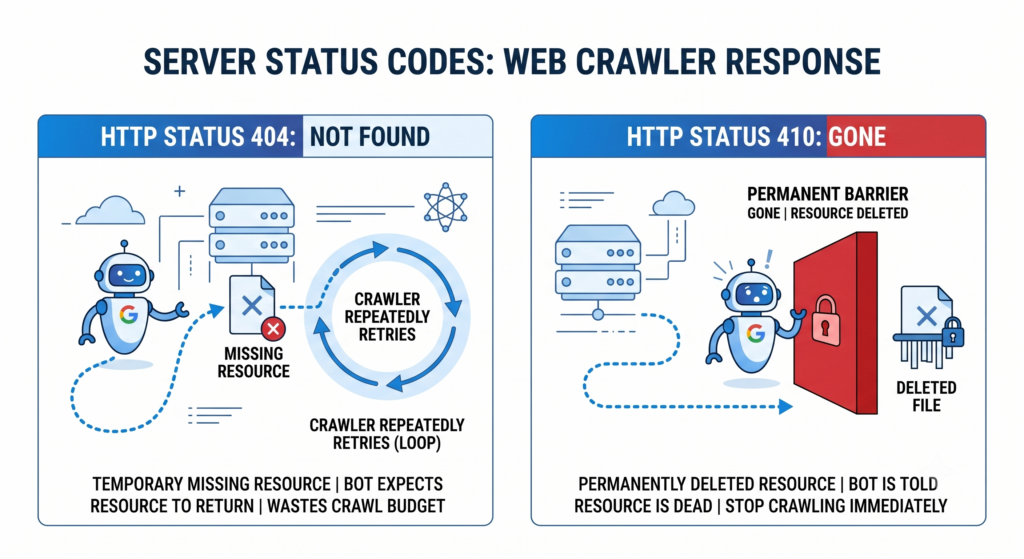
A standard 404 Not Found status implies a temporary absence, which prompts Googlebot to repeatedly queue and recrawl the pathway to see if the content reappears. A 410 gone status code serves as an explicit command to search engine spiders that the resource is permanently dead.
This strict directive forces the bots to immediately drop the pathway from the crawl queue and accelerates the permanent de-indexing process. For standard site maintenance, a 404 is perfectly acceptable, but post-hack cleanup requires the aggressive finality of a 410 status to purge malicious URLs.
How do I configure my .htaccess file to return a 410 Gone status for spam?
You must inject a specific rewrite rule into your root Apache server configuration file to force a clean 410 response for legacy malware directories. Knowing how to rewrite rules 410 in .htaccess prevents search engines from wasting resources on dead folders. Technicians must target the exact path used by the attackers, verify the syntax, and test the header response in an incognito browser to confirm a clean “Gone” response.
RewriteEngine On
RewriteCond %{REQUEST_URI} ^/old/ [NC]
RewriteRule ^ – [L,R=410]
How do I properly use the Google Search Console URL removal tool?
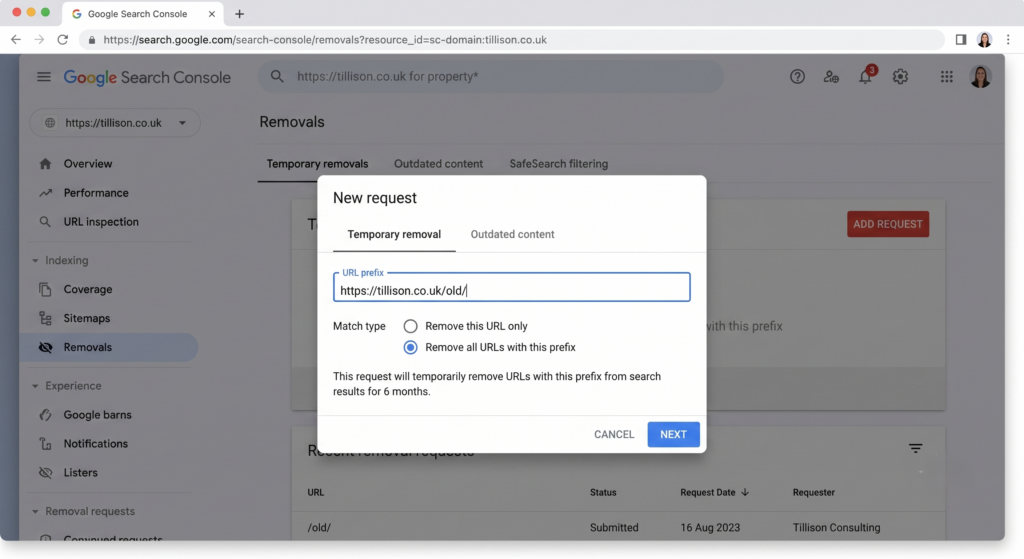
Because background recrawl processes require time, you must manually shield your live search results from displaying spam during the interim period. You can achieve this immediate protection by deploying the Google Search Console removals tool.
This system allows you to remove hacked URL from Google search results and effectively resolve hacked URL injection with Google while your newly implemented .htaccess rules process in the background.
How do I bulk remove URLs from the Google Search Console?
The standard interface does not support uploading a standalone list of individual, unrelated links. However, you can successfully bulk remove URLs from Google using directory-level prefix matches.
During a recent cleanup, we bypassed the common “URL not in property” error by submitting the exact string matching the active property structure, formatted strictly as [[protocol] /[domain]/[malware-subfolder]/]([protocol] /[domain]/[malware-subfolder]/). Submitting this exact directory path instantly hides all matching links from live search results for approximately six months.
Why does Search Console report my own domain as the referrer for spam URLs?
Many webmasters panic when their referring page in Google Search Console points back to their own domain for external spam attacks. During our analysis of thousands of spam URLs ending in /1000 and //1000, the initial suspicion was that a rogue Elementor pagination setting was actively generating garbage pages internally.
What is a referring page in Search Console?
This is merely a server-side redirect chain rather than a broken internal script. When an external bot crawls an invalid double-slash parameter such as //1000, your server automatically intercepts the syntax error and redirects it to a single-slash variation. Googlebot logs this redirect hop and incorrectly reports your own domain’s redirect as the original referring source.
How do I stop spam bots from generating fake pagination loops (like /1000)?
Security breaches are frequently followed by automated external attacks where bots scrape legitimate URLs, append garbage parameters like /1000 to them, and post them across low-quality external directories. Fortunately, standard WordPress configurations naturally resolve a spam bot pagination loop through canonical redirect guessing.
The system ignores the invalid parameters and successfully serves the matching canonical post with a 200 OK status. While you may notice a “Page fetch successful” log or a “Sitemaps Temporary processing error” in the inspection tool, Google’s filters naturally recognise the duplicate content. They assign an “Indexing allowed? N/A” status and safely drop the junk links into the unindexed bucket without harming your crawl budget.
How often should you monitor Google Search Console after a website hack?
Managing post-hack recovery requires consistent oversight to ensure server rules remain active, secondary crawl spikes are detected, and indexing stabilises. Our team recommends checking your reports weekly for the first two months following a security breach to track the degradation of spam links.
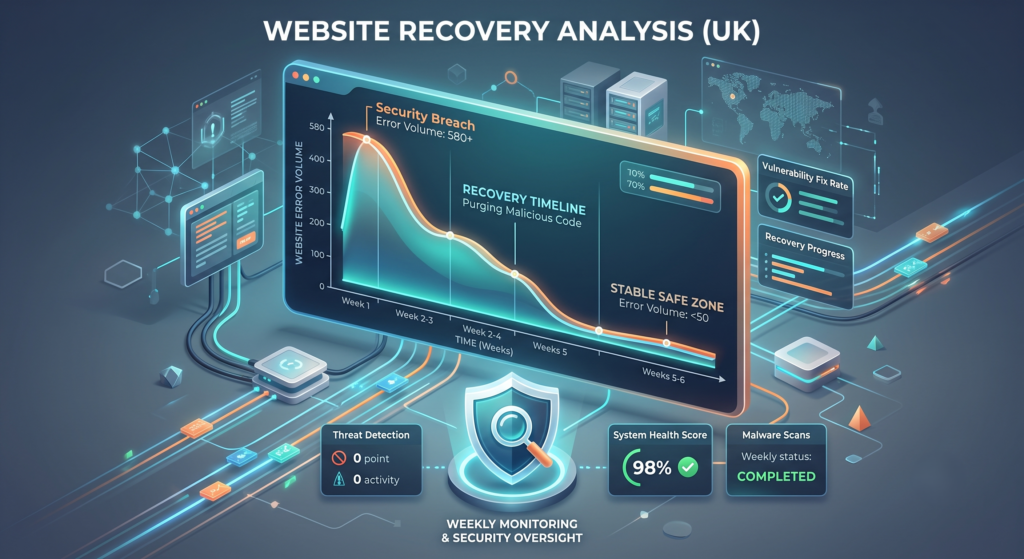
During our active monitoring, we tracked a reduction until exactly 85 spam links remained, allowing us to confirm the external attacks were subsiding. Once your spam crawl counts steadily decline, you can safely return to a standard monthly monitoring schedule.
Conclusion
Successfully completing a hacked website recovery demands a systematic process of server-side signals, search engine coordination, and technical patience. Serving 410 status codes commands search engines to permanently drop dead casino spam pages, while exact prefix removals temporarily shield your brand’s reputation.
By systematically purging malicious index bloat, you protect your organic visibility and ensure search engines focus exclusively on your high-value assets. Arrange a private technical consultation with our specialist team to secure your domain’s post-hack indexing and recovery processes.